Socialising browsers & Chrome


Firefox is currently my browser of choice. I use it at home on my Macs and at work (as I managed to get in before the IT crowd started regulating use of it because like many social networks, Firefox might cause chaos, anarchy and the collapse of civilisation as we know it).
Anyway, I have started using the Yoono add-on to see whether it has any benefit in “socialising” my browser to manage feeds to my networks and perhaps to other stuff like news feeds. You too can try it here.
I’ll let you know how it goes for me as I’m a really new user and still haven’t explored it much. It sounds appealing and I agree with this post from ReadWriteWeb that it might enable me to keep track of a few things that have started to clutter up my Google Reader.

There have been a lot of posts about Google’s Chrome browser, but I liked these early reflections best, from the wonderful JOHN TANgerine.

My take on the Olympics in Beijing

Image above: Matthew Mitcham, from his Facebook page. His win was the moment of the Games for me, marginally ahead of Sally McLellan, Jared Tallent and Steve Hooker.

Image above: Italy’s Giovanna Trillini (L) competes against Cuba’s Misleydis Company during the Women’s individual Foil elimination round of 32 match on August 11, 2008 at the Fencing Hall of National Convention center, as part of the 2008 Beijing Olympic games. Trillini won 15-7. (ADRIAN DENNIS/AFP/Getty Images).

This post will by dynamic. I will keep adding my observations as they come to mind. Oh, this definitely has an Australian bias. I wasn’t going to get too interested in the Olympics this time, in fact I really didn’t four years ago, but there were so many brilliant surprises and historic moments this time. These events can only be positive for China.

Opening Ceremonies. Zzzzzzz. Who cares? I do not think that we should need armies to run or entertain us at big sporting events, wearing uniforms or not. Hopefully they will not try to do it in the same way in London. I would rather see the money devoted to sport itself.

Inane morning TV programs. Yum Cha, the lowest of the low. Why? They occupy time that could have been used to show delayed telecasts or at least highlights of events that could not be broadcast live the day before. Mostly they are full of stooopid comments from assorted B-grade idiots who do not understand any sports and seem more interested in self-promotion than anything else. Their only saving grace is that (hopefully) they provide canon-fodder for the acerbic SMH journalist and TV-reviewer Ruth Ritchie. Please Ruth, pleeeeeaaaassseee!!!!

Inspiration. Michael Phelps, Stephanie Rice, Drew Ginn & Duncan Free, the Australian hockey teams, the Australian female swimmers, Emma Snowsill, Jared Tallent, both 470 crews, Sally McLellan, Steve Hooker and perhaps above all the others Matt Mitcham . . . (more to be added I hope). They stood out to me from the sports I managed to watch. Phelps is a complete legend, almost too good to be true. Jared Tallent pushed himself so hard that he threw up twice in the finishing straight, then he backed up with 2nd in the 50 km walk. Their results are not just from four years of work. To do what they do usually requires many more years of extreme devotion and more hard work than any of us have ever done. They showcase humanity almost at its peak. We can’t all be Olympians, but their efforts can at least inspire us to overcome inertia, resistance and sheer incompetence in our daily work. How many of them have said that nothing is impossible so far? Did Matt Mitcham and Steve Hooker choke under enormous pressure when the gold was on the line before their final jump? I don’t think so. What fantastic mental strength and belief in their own capability. I was so impressed. Matt’s win was unexpected and certainly against all odds.

Hope. I hope that those we find inspiring are “clean” and that more honest-looking and talented hard workers like all those Jamaican sprinters continue to beat the heck out of all of those big-headed, loud-mouthed, steroid-fed show-offs from you-know-where. And I hope we continue to see more inspirational efforts in the last week. I also hope we never have to see Happy Daddo and his stooopid side kicks associated with serious sport ever again. I hope Jo Griggs continues to be associated with sports broadcasting. She knows what it means and doesn’t try to steal the limelight from the real stars, nor does she feel the need to remind us of her own sporting glory.

Entertainment. The Australian womens’ water polo team coach; all of the gymnasts and divers; Phil Liggett (the doyen of cycling commentators, who could make paint-drying sound exciting); the laconic Mike Turtur (84 Olympic cycling gold medallist and commentator); and Steve Moneghetti whom I will always remember for his impartial, objective and highly technical call of the final moments of the 5,000m event won by Andrew Lloyd at the 1990 Commonwealth Games in Auckland: “LLOYDIE, LLOYDIE!!!!!!”. And the brilliant association of fantastic sporting images and drama with Massive Attack’s Teardrop during the final night’s coverage on Seven. It worked for me!

The Olympics and Social Media. For me this was one huge distinction between this and previous Olympics. You didn’t need to donate to Telstra to send a personal message to athletes who had the brains to set up social media profiles. As soon as Sally McLellan won her silver and spread joy to athletics fans all over Australia, I was straight onto her Facebook profile and sent her congratulations. She even mentioned receiving the messages in her post-race media interviews. With Matthew Mitcham I could go even further as someone had set up a fan page for him on Facebook. Within about 36 hours of him making the 10 m platform diving final the total number of his global fans had increased (from memory) by about 4-5,000. This indicates a few very powerful aspects of Social Networks: their viral power, world-wide reach and spread; community (in this case probably strongly GLBT or GLBT-friendly); and the need people have now to express themselves or engage when they feel strongly about something. Whilst those of us in cultural institutions might not always be able to compete with such popular figures and events such as the Olympics, there is nevertheless a lot for us to learn from this.

In conclusion, I would like to add here that I think Matthew’s final gold medal was very important for Australians. His attitude, emotion and his open, honest and very articulate responses to the media left all of us in a very positive frame of mind post-Olympics. I take nothing away from the efforts of previous medal winners, but I feel and I have heard it said elsewhere, that some of the swimmers’ interviews were just too well-drilled and unconvincing. Perhaps Ian Hanson does too good a job with them and now their responses just don’t have half the credibility and spontaneity that Matthew and Sally did. The media just lapped them both up.

Libraries and building communities

These notes come from a talk I attended earlier today at the National Library of Australia on building online communities. The speaker was Chrystie Hill, Director of Community Services at WebJunction.org, from Seattle, WA.

It was interesting to hear about her journey as she spoke using stories, and didn’t just regurgitate facts.

She spoke of the shift in services for things like reference – both physical and in the virtual world. She experienced this when being educated. She has worked in the Seattle Central Library and says that the space is now much better to work in. Then she introduced her four seminal realisations (my term, not hers):

See The Great Good Place by Ray Oldenburg is about connections between people: pubs build communities.

She also spoke of John Seely Brown and The Social Life of Documents (on FirstMonday): documents build communities.

And Bowling Alone by Robert D. Putnam and the decline of civic engagement & social capital in US: capital and networks build communities.

Is your library relevant to you (& your needs)? She said hers wasn’t (at the time) and her most important need was to know what her friends were doing: individuals build communities.

Libraries were not accepting their role as community builders (maybe they still don’t understand that role at all?). But US public libraries became carriers for public Internet access in the 1990s. Eventually home and work use of the Internet also grew. People soon began to find themselves on the web – publishing, subscribing & sharing. It became a story of communities and collaboration on a scale never seen before. Now libraries (& librarians) have to be involved to stay relevant. It is about conversations. It is about people who are saying “here is what I am doing”. People sit behind all the tools and experience. It is also about what your friends are doing. So many tools are now available that it can seem overwhelming, so step back and look at what is behind it all.

So, where is the library?

People are finding their own answers easily on the web themselves. Library use is going down while use of email, online bookstores and search engines is going up!

Can libraries cope where the stuff isn’t completely organised or controlled? Probably not. Many public libraries are closing in the US because they lost their relevance and then they lost their funding. See Content, not Containers (an Information Format Trends report from OCLC, 2003).

Do libraries just = books? Do our users think of us for other information needs? Do we just stop making it feel like church?

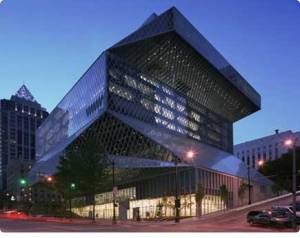
She then went back to the new Seattle City Library (image appears above in this post) and said it is what a library should look like (if only!). Real visitation went up 300% in its first year. Public access computer use quadrupled. Its spaces are very inviting and its services are very innovative: multi-lingual programs; online assistance; teen services (via MySpace) – with 50% boys participating!. They are building communities daily and get 1,000s of teens involved.

She said we must do better jobs in all libraries. Online tools help us to see our roles as connectors, facilitators, and community builders.

Currently, Chrystie is writing a book and blogging (one of several). She spoke for a while about the work of Webjunction.org – helping to build relevant vibrant, sustainable libraries in every community. Most content comes from members and partners. All of it is wrapped around social engagement. Public access computing and personalisation services were key to this and to building real communities.

What do they do?

They connect, create and learn:

Connect: using wikis, del.icio.us (others follow this without it being promoted, they just find it – they just use one tag to share stuff for all, eg. we could use AWMWSG or AWMRC), micro-blogging (they use Twitter), phone, Flickr groups, Facebook groups and events, and alternate spaces (eg. LinkedIN, engaging widely!)

Create: blogs and wikis, blip.tv (I suspect schools might find this easier to find than our content on www.awm.gov.au or our blocked content on YouTube), and staff are encouraged to contribute elsewhere (blogs, publications, etc.)

Learn: active learning is encouraged, staff/members are surveyed – What was your greatest achievement last year? (part of bi-annual member survey on webjunction.org – results were visually presented in a tag-cloud), speaking engagements, blogging internally and externally encouraged for all staff.

So what does this mean for us at the Memorial? I think we are heading in the right direction. We are not there yet, but we’ve made a good start and even though we might complain about some restrictions placed on us by out IT staff, they have already facilitated much more freedom and innovation in our organisation than many, may others (judging by the tone of questions asked of Chrystie). Our management too have been both supportive and visionary. How many national cultural institutions can boast that they now have these words as their first listed corporate priority for the 2008-2011 period: “Enhance online access through use of emerging web technologies and improved web content”?

The next 5,000 days of the WWW (Kevin Kelly)

I found this to be a very interesting video on the future of the web from Kevin Kelly on ted.com.
Kevin is a publisher, an editor at Wired Magazine and a writer. He is known for his fresh perspectives on technology and its consequences.

For those too busy to watch and listen here is my quick summary.
Kevin begins by throwing up some astounding numbers and statistics about the web that even he admits are too large for us to comprehend. He estimates that now the web matches the processing power and activity of one human brain, but by 2030 it will match six billion human brains (it is doubling every two years) and it will exceed humanity’s processing power by 2040.
He postulates three major changes for the future web or its next 5,000 days:

  1. embodiment,
  2. re-structuring, and
  3. co-dependency.


EMBODIMENT

All will be connected through the web and become web-based. Software and phones are already moving to be web-based and soon the same thing will happen for items (eg. “chips with heels and wheels”). There will soon be one media platform and media will be “free” in the sense of restrictions on its use (not necessarily cost). Humans will become extensions of the machine or the one web platform.

RE-STRUCTURING

He refers to the emergence of the semantic web. The web began with people sharing information on their web pages; then they linked to other web pages; and now we are linking to open data and ideas everywhere. So we will see more of XML; RSS; APIs; RDF; and OWL . All of this will assist in the linking of data from everywhere. Data must be open for it to be shared. It will become an Internet of “things” (physical things).

CO-DEPENDENCY

Here he refers to the total personalisation of the web IF your data is transparent. Google could serve as much of your own memory and Google is moving towards AI. WE are the web and become one “machine”.

Kevin says the differences with the web will be that it is:

  • smarter (anticipating more needs);
  • personalised; and
  • ubiquitous (for all devices become portals into it.

He refers to the emergence of ONE large organisation in unity with itself: ONE machine; the web is the operating system; all screens point to ONE; to share is to gain; let ONE read it; and ONE is us.

Even if we don’t agree with everything he has to say I think there are a number of very important and strong messages in this talk.

Encouraging exploration in social media @ work


A friend asked me via Facebook what social media tools we’ve been encouraging staff to play with at work. (I used to say Web2.0 tools, but have now ceased using that term after reading something on Peta Hopkins Innovate blog .)
We could have gone with anyone of a dozen existing programs ranging from 16-43 “things” but decided to quickly tailor a program to our needs and our endorsed strategic directions for our website. Liz (our Web Manager) and I put it all together in super quick time by collaborating on the one Google Doc. It seems to have attracted enough keen participants and we are happy with the result so far.
So, here are our “ten things” (actually there are nine because thing #1 is an internal thing – applying for extended network access to Firefox browser, Facebook, YouTube, etc.):

  1. iGoogle and a Gmail account (I know Yahoo is another alternative, but to keep it simple we selected Google);
  2. Blogs & blogging (duh);
  3. RSS and feed readers;
  4. social bookmarks (we picked del.icio.us);
  5. sharing presentations (eg. SlideShare);
  6. social networks (Facebook & ArtShare, LinkedIn);
  7. social media “things” (including: Flickr, YouTube & Podcasts);
  8. wikis and Wikipedia.org; &
  9. “other” tools and applications we invited participants to find and explore themselves (Zoho, Google Docs, Open/NeoOffice, CutePDF, Rollyo, LibraryThing, Last.fm).

We’ve used several CommonCraft videos (which I think are GREAT!) and Wikipedia definitions where available and useful to introduce each “thing” so as not to overload them with too many motherhood statements from us.
To facilitate all of this we are using Ning. It is another social network and we think it has been very helpful in facilitating: forum discussions, user profiles, blog posts, the formation of groups for projects and the hosting of videos. It isn’t perfect (yet), but it is almost free (we pay a monthly subscription to get the adverts removed). Hopefully they’ll eventually introduce a spell checker and some easy way to export useful discussions. It hasn’t been made compulsory, but so far we’ve managed to get 52 staff involved – almost a fifth of our total staff. The groups we’ve set up focus on progressing small sub-projects such as Flickr Commons, ArtShare on Facebook, Copyright, our Digitisation Steering Group and Marketing. Just participating in our internal Ning network is itself a learning experience for some people.

Using iPods in the Museum

I heard an interview (online) today with Chris Alexander from the San Jose Museum of Art. They are doing some very cool stuff with iPod Touch devices and a wifi network in their museum. The interview is podcast on the here.
If you don’t have the time to listen, these are the main points that I picked up:

  • they are mainly using it for a current exhibition and also to feature the work of some of the artists in their collection who have been filmed at work in their own studios;
  • they have a multi-use approach with delivery of the same material via many platforms using their YouTube channel, RSS, iPods that visitors can check out, a wifi network in the museum and as audio files on their website;
  • they were originally using video iPods in “notes-only” mode, so they were locked down for use specifically in the museum;
  • they are now using iPod Touch devices because they offer a better interface and more possibilities including the upload of user comments (not quite there yet);
  • they deliver all content to visitors via a wifi network or website only available in the museum, so that saves synch-ing or updating 20-30 devices for new or changed content;
  • if you don’t have an iPod or iTouch you can check out one of 20 they have now and they will eventually have 30;
  • other US museums experimenting in this space include MoMA (NYC), SFMoMA, Denver, but Chris says a lot of museums are looking at using the same technology;
  • he said the URL for their online iPod content was sjma.mobi but on a computer terminal it comes up as http://www.sjmusart.org/m/#_home;
  • Chris said they go into the artist’s studio and film them working, but only one in 30 has declined their suggestion to do this and some of the artists have embedded their YouTube vids on their own sites too; and
  • again he mentioned their intention to use the devices to allow users to upload their own comments about their experience.

I reckon this is a great model for us and many other museums. I’m not sure whether their wifi content will only work on Apple’s devices and I think that might be a bit limiting in an Australian setting.
SJMA’s home page is here: http://www.sjmusart.org/

Brilliant, big images!


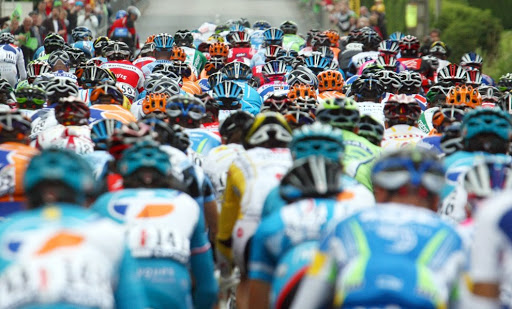
Have a look at these fantastic images of the drama and spectacle of the Tour de France. They come from the Boston Globe’s blog The Big Picture. As a friend of mine said they’ve been given the prominence they deserve on the web.
Now read this interview on waxy.org with the blog’s creator, Alan Taylor. In this interview he explains why he it is important to see these images in (nearly) all their glory. He also talks about the dimensions of the image and how it would not scale up for print resolution that well.
I think we are far too conservative with our images in cultural institutions and we have a lot to learn from this interview. The Big Picture blog has proved to be extremely popular and engaging.

Thumbs down to iPhone in Oz

The plans are simply unaffordable. We are being ripped off by the carriers. I was going to post about this, but a friend beat me to it with a better post on his blog.
As a fan of Apple (two Mac laptops and three iPods, including a Touch) I am very disappointed that I won’t be able to by an Apple iPhone to replace my VERY old Siemens ME45.
Here is the link to Paul’s post about iPhones in Oz.

Where I work

This is just a quick vid from Animoto. I was mucking around with images and music thinking about how museums could perhaps do less interpretation and use more music to create a mood or reflective environment. I had limited choice on the backing music to this short clip, so just picked what was available, but I’ll try and find a better MP3 at home over the weekend.

Web 2.0 in one museum (in-house training)

Apologies for the lack of content recently. I’ve been too busy at work. My exhibition finished and was pulled down and then I had to take up another part-time role as the chair of our new web strategy group. In the last few weeks we’ve explained the priority and scope of this new initiative to our Council (or board) and at an all-staff meeting. Since then I’ve been actively involved in setting up an internal forum (we are using Ning) and in training our staff on the use of some common web 2.0 applications.

I think we are blessed with pretty enlightened leadership at the Memorial, because we have embraced the potential of web 2.0 at a reasonably Early stage and we’ve been allowed a pretty free hand to experiment and innovate. Without this, I’m sure an initiative like this is doomed.

So, here is a bit of an outline of the early progress. We have started by getting some volunteers or nominees to join our online forum and set up some basic groups on it for special interests like our historians, education and two projects to progress our presence on Facebook’s ArtShare and the Flickr Commons. The Ning forum or network also has several blog posts running to some pretty inspiring online presentations by people such as Clay Shirky and Mark Pesce.

The idea is to get each of our internal “communities” to bring forward their own suggestions and initiatives, rather than generating them centrally. First, we need our staff to become familiar with what is out there. What we needed to do was gather a small group around a set of terminals and set them up with the relevant accounts.

Firstly, we arranged access to the Firefox browser and Facebook from their work account. Some of the tools we want you to start playing with don’t work very well in IE7.

We started by setting them up with some useful tools in iGoogle. So, they were asked to go Google and register to set up an account. We then asked them to play with their iGoogle page, setting up some useful “widgets” that appear every time you login.

Next was Google Reader (because that is the feed reader I use!). It provides an easy way to automatically subscribe to blogs and other website that are updated regularly, like newspapers. Blogs of interest can be found on Google Blog Search. Most of our staff are already pretty familiar with blogs as we were one of the earlier museum bloggers.

After that we moved to set up a social bookmark account on del.icio.us. We networked the participants with a set of bookmarks that I use and briefly covered how to make the best use of it. I think we can really do some very useful things with del.icio.us to gather together useful and little know areas of our huge website for certain interest groups. (More on this idea in a later post.)

After that we quickly covered SlideShare, a rich source of shared presentations from various sources on virtually all subjects. It is very easy to set up an account, search for and then save your faves.

Finally, we set everyone up with a Facebook account and asked them to add a couple of friends.

The training session took 90 minutes. In our next phase we will tackle more tools like LinkedIN, You Tube and wikis. I think I’ll also add in OpenID because we are setting up so many different accounts.