The next 5,000 days of the WWW (Kevin Kelly)

I found this to be a very interesting video on the future of the web from Kevin Kelly on ted.com.
Kevin is a publisher, an editor at Wired Magazine and a writer. He is known for his fresh perspectives on technology and its consequences.

For those too busy to watch and listen here is my quick summary.
Kevin begins by throwing up some astounding numbers and statistics about the web that even he admits are too large for us to comprehend. He estimates that now the web matches the processing power and activity of one human brain, but by 2030 it will match six billion human brains (it is doubling every two years) and it will exceed humanity’s processing power by 2040.
He postulates three major changes for the future web or its next 5,000 days:

  1. embodiment,
  2. re-structuring, and
  3. co-dependency.


EMBODIMENT

All will be connected through the web and become web-based. Software and phones are already moving to be web-based and soon the same thing will happen for items (eg. “chips with heels and wheels”). There will soon be one media platform and media will be “free” in the sense of restrictions on its use (not necessarily cost). Humans will become extensions of the machine or the one web platform.

RE-STRUCTURING

He refers to the emergence of the semantic web. The web began with people sharing information on their web pages; then they linked to other web pages; and now we are linking to open data and ideas everywhere. So we will see more of XML; RSS; APIs; RDF; and OWL . All of this will assist in the linking of data from everywhere. Data must be open for it to be shared. It will become an Internet of “things” (physical things).

CO-DEPENDENCY

Here he refers to the total personalisation of the web IF your data is transparent. Google could serve as much of your own memory and Google is moving towards AI. WE are the web and become one “machine”.

Kevin says the differences with the web will be that it is:

  • smarter (anticipating more needs);
  • personalised; and
  • ubiquitous (for all devices become portals into it.

He refers to the emergence of ONE large organisation in unity with itself: ONE machine; the web is the operating system; all screens point to ONE; to share is to gain; let ONE read it; and ONE is us.

Even if we don’t agree with everything he has to say I think there are a number of very important and strong messages in this talk.

Encouraging exploration in social media @ work


A friend asked me via Facebook what social media tools we’ve been encouraging staff to play with at work. (I used to say Web2.0 tools, but have now ceased using that term after reading something on Peta Hopkins Innovate blog .)
We could have gone with anyone of a dozen existing programs ranging from 16-43 “things” but decided to quickly tailor a program to our needs and our endorsed strategic directions for our website. Liz (our Web Manager) and I put it all together in super quick time by collaborating on the one Google Doc. It seems to have attracted enough keen participants and we are happy with the result so far.
So, here are our “ten things” (actually there are nine because thing #1 is an internal thing – applying for extended network access to Firefox browser, Facebook, YouTube, etc.):

  1. iGoogle and a Gmail account (I know Yahoo is another alternative, but to keep it simple we selected Google);
  2. Blogs & blogging (duh);
  3. RSS and feed readers;
  4. social bookmarks (we picked del.icio.us);
  5. sharing presentations (eg. SlideShare);
  6. social networks (Facebook & ArtShare, LinkedIn);
  7. social media “things” (including: Flickr, YouTube & Podcasts);
  8. wikis and Wikipedia.org; &
  9. “other” tools and applications we invited participants to find and explore themselves (Zoho, Google Docs, Open/NeoOffice, CutePDF, Rollyo, LibraryThing, Last.fm).

We’ve used several CommonCraft videos (which I think are GREAT!) and Wikipedia definitions where available and useful to introduce each “thing” so as not to overload them with too many motherhood statements from us.
To facilitate all of this we are using Ning. It is another social network and we think it has been very helpful in facilitating: forum discussions, user profiles, blog posts, the formation of groups for projects and the hosting of videos. It isn’t perfect (yet), but it is almost free (we pay a monthly subscription to get the adverts removed). Hopefully they’ll eventually introduce a spell checker and some easy way to export useful discussions. It hasn’t been made compulsory, but so far we’ve managed to get 52 staff involved – almost a fifth of our total staff. The groups we’ve set up focus on progressing small sub-projects such as Flickr Commons, ArtShare on Facebook, Copyright, our Digitisation Steering Group and Marketing. Just participating in our internal Ning network is itself a learning experience for some people.

Using iPods in the Museum

I heard an interview (online) today with Chris Alexander from the San Jose Museum of Art. They are doing some very cool stuff with iPod Touch devices and a wifi network in their museum. The interview is podcast on the here.
If you don’t have the time to listen, these are the main points that I picked up:

  • they are mainly using it for a current exhibition and also to feature the work of some of the artists in their collection who have been filmed at work in their own studios;
  • they have a multi-use approach with delivery of the same material via many platforms using their YouTube channel, RSS, iPods that visitors can check out, a wifi network in the museum and as audio files on their website;
  • they were originally using video iPods in “notes-only” mode, so they were locked down for use specifically in the museum;
  • they are now using iPod Touch devices because they offer a better interface and more possibilities including the upload of user comments (not quite there yet);
  • they deliver all content to visitors via a wifi network or website only available in the museum, so that saves synch-ing or updating 20-30 devices for new or changed content;
  • if you don’t have an iPod or iTouch you can check out one of 20 they have now and they will eventually have 30;
  • other US museums experimenting in this space include MoMA (NYC), SFMoMA, Denver, but Chris says a lot of museums are looking at using the same technology;
  • he said the URL for their online iPod content was sjma.mobi but on a computer terminal it comes up as http://www.sjmusart.org/m/#_home;
  • Chris said they go into the artist’s studio and film them working, but only one in 30 has declined their suggestion to do this and some of the artists have embedded their YouTube vids on their own sites too; and
  • again he mentioned their intention to use the devices to allow users to upload their own comments about their experience.

I reckon this is a great model for us and many other museums. I’m not sure whether their wifi content will only work on Apple’s devices and I think that might be a bit limiting in an Australian setting.
SJMA’s home page is here: http://www.sjmusart.org/

Brilliant, big images!


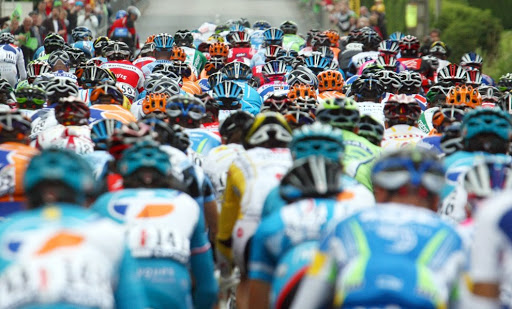
Have a look at these fantastic images of the drama and spectacle of the Tour de France. They come from the Boston Globe’s blog The Big Picture. As a friend of mine said they’ve been given the prominence they deserve on the web.
Now read this interview on waxy.org with the blog’s creator, Alan Taylor. In this interview he explains why he it is important to see these images in (nearly) all their glory. He also talks about the dimensions of the image and how it would not scale up for print resolution that well.
I think we are far too conservative with our images in cultural institutions and we have a lot to learn from this interview. The Big Picture blog has proved to be extremely popular and engaging.

Thumbs down to iPhone in Oz

The plans are simply unaffordable. We are being ripped off by the carriers. I was going to post about this, but a friend beat me to it with a better post on his blog.
As a fan of Apple (two Mac laptops and three iPods, including a Touch) I am very disappointed that I won’t be able to by an Apple iPhone to replace my VERY old Siemens ME45.
Here is the link to Paul’s post about iPhones in Oz.

Where I work

This is just a quick vid from Animoto. I was mucking around with images and music thinking about how museums could perhaps do less interpretation and use more music to create a mood or reflective environment. I had limited choice on the backing music to this short clip, so just picked what was available, but I’ll try and find a better MP3 at home over the weekend.

Web 2.0 in one museum (in-house training)

Apologies for the lack of content recently. I’ve been too busy at work. My exhibition finished and was pulled down and then I had to take up another part-time role as the chair of our new web strategy group. In the last few weeks we’ve explained the priority and scope of this new initiative to our Council (or board) and at an all-staff meeting. Since then I’ve been actively involved in setting up an internal forum (we are using Ning) and in training our staff on the use of some common web 2.0 applications.

I think we are blessed with pretty enlightened leadership at the Memorial, because we have embraced the potential of web 2.0 at a reasonably Early stage and we’ve been allowed a pretty free hand to experiment and innovate. Without this, I’m sure an initiative like this is doomed.

So, here is a bit of an outline of the early progress. We have started by getting some volunteers or nominees to join our online forum and set up some basic groups on it for special interests like our historians, education and two projects to progress our presence on Facebook’s ArtShare and the Flickr Commons. The Ning forum or network also has several blog posts running to some pretty inspiring online presentations by people such as Clay Shirky and Mark Pesce.

The idea is to get each of our internal “communities” to bring forward their own suggestions and initiatives, rather than generating them centrally. First, we need our staff to become familiar with what is out there. What we needed to do was gather a small group around a set of terminals and set them up with the relevant accounts.

Firstly, we arranged access to the Firefox browser and Facebook from their work account. Some of the tools we want you to start playing with don’t work very well in IE7.

We started by setting them up with some useful tools in iGoogle. So, they were asked to go Google and register to set up an account. We then asked them to play with their iGoogle page, setting up some useful “widgets” that appear every time you login.

Next was Google Reader (because that is the feed reader I use!). It provides an easy way to automatically subscribe to blogs and other website that are updated regularly, like newspapers. Blogs of interest can be found on Google Blog Search. Most of our staff are already pretty familiar with blogs as we were one of the earlier museum bloggers.

After that we moved to set up a social bookmark account on del.icio.us. We networked the participants with a set of bookmarks that I use and briefly covered how to make the best use of it. I think we can really do some very useful things with del.icio.us to gather together useful and little know areas of our huge website for certain interest groups. (More on this idea in a later post.)

After that we quickly covered SlideShare, a rich source of shared presentations from various sources on virtually all subjects. It is very easy to set up an account, search for and then save your faves.

Finally, we set everyone up with a Facebook account and asked them to add a couple of friends.

The training session took 90 minutes. In our next phase we will tackle more tools like LinkedIN, You Tube and wikis. I think I’ll also add in OpenID because we are setting up so many different accounts.

Preservation, Web 2.0 and chamber orchestras (2) – following the lead of the Australian Chamber Orchestra with our cultural digitisation programs

This is most of the text for my recent “provocative paper” at the 2008 Museums Australia Futures Forum in Canberra. The rest of the text was made up as I talked to the slides I used, so if you wanted to hear them you should have come the the forum. My slides are now up on Slideshare (see the post above).

The Australian Chamber Orchestra (ACO) brings old music to life with their live performances. Sometimes they challenge the audience with new interpretations or even “mash-ups” of old and new music. Museums succeed in giving their own well-interpreted performance when they go beyond just shovelling huge amounts of scanned material on the web. I think it is a bit like the ACO breathing new life into old music.

Parallels (does anyone know a neater way to include a table in Blogger?):

Orchestras

Museums

Instruments, music

Collections

Performances

Exhibitions & curatorial interpretation

Tours & media broadcasts

Touring exhibitions and content on new online networks

Recorded music

Digitised collections

I think there is a further parallel in what the public expects from both orchestras and museums: a professional, engaging and enthusiastic performance. I think the ACO is a better example than a full scale symphony orchestra as it is easier for curators to identify with the artistic leadership given by Richard Tognetti, who usually leads the ACO from his violin, than the more formal orchestra conductor waving a baton from a podium.

Museum curators need to manage and care for the collections resulting from our digitisation programs just as we manage our physical collections and museum curators need to be interpreting our online content by playing “our own instruments”. That interpretation needs to be delivered in many different ways. I don’t think we can just assume the public will find and use it on our rather static websites. Blogs, Flickr groups, social networks and applications like Art Share on Facebook, You Tube videos, podcasts or downloadable audio guides are just a few examples of the relatively new means curators should be using to draw attention to our digitisation programs and collections. They’re a little like touring exhibitions or broadcast performances, on the internet.

We need to recognise that digitisation of cultural material for preservation is also good for access. Digital assets created and acquired by digitisation initiatives must be managed and preserved. I believe that the provision of free and open access to the digitised collections of public cultural institutions is also an essential part of the process.

Using new online technologies, we can now facilitate the addition of public descriptions to these files. We can even collaborate with the public in the development of online exhibitions. But, I would not go as far as to say that simply allowing our users (or the audience to use the orchestra analogy again) to generate most of the supposed content of our websites is going to please anyone. If we use the new technologies and social networks primarily to allow users to make comments all over our online catalogues then that is the same as the ACO (or any orchestra) inviting those who have paid to attend a concert to get up on stage and have a go themselves. I believe the public want and deserve more from us than just engagement and conversation. We are being paid for our professional skills in museums, libraries and archives and have an obligation to digitise our collections and provide well-interpreted access to them online as well as other rich content for our websites, just as the ACO performs its music on stage.

I am certainly a keen advocate for social networking and going beyond “metadata” and traditional forms of museology, but there is something more fundamental to do before that kind of “window-dressing” becomes the top priority. We still need to be developing and interpreting fundamental digital collection content.

Some of my colleagues attended the first national Summit on Digital Collections in Adelaide in 2006, but despite a draft National Framework being circulated, not much has since changed. So what we have are some words on a page, but no music yet and certainly no instruments to play it with.

What do we need now? I believe we need some kind of national centre of excellence that is capable of encouraging us in the digitisation of cultural materials. But it should also provide research, advice, and facilitate collaboration, cooperation and training. Perhaps it could also coordinate a shared digital repository service (like CAN) for the poorer institutions who cannot afford their own digital storage.

Much of the advice and research is also available online from UK, US and European sites but the situation overseas is vastly different from our own environment and culture. We have different funding models, differing public expectations, different uptake and spread of broadband and mobile coverage and in many cases our national cultural institutions are well ahead of our overseas counterparts. There is nothing in Australia that meets our specific needs or is close enough geographically for us to have shared conferences, seminars and workshops without paying far too much money on overseas travel.

There are many examples of individual Australian digital initiatives that would be the envy of many overseas institutions. A quick list includes the National Library’s Pandora web archive, the Stable Tasmanian Open Repository Service, the Victorian Electronic Records Strategy, Picture Australia, and massive digitisation programs from the Australian War Memorial and the National Archives of Australia. Currently, something like a large shared digital repository and research service is really only being progressed in the Australian university sector for academic material in projects such as ARROW (led by Monash University) and Demetrius (at ANU). There is nothing like this in the Australian cultural sector.

Maybe we just need to set up an Australian partner centre under one of the international organisations, but we also need some local presence or we will all just keep moving forward in an uncoordinated manner and using vastly different file formats, standards, and even different preservation metadata. Sadly, I think too few institutions are planning for their digital future by setting up trusted digital repositories for their growing collection of digital assets. In the end, if the world decides that the only real digital repository is a certified “Trusted Digital Repository”, that is audited to standards being developed in the US (by OCLC/RLG and NARA) and Germany, will anyone in an Australian cultural institution have had a say in developing that audit checklist? That will make everything more difficult than it needs to be in the future. The “music” might be lost and even if it isn’t, we might not be able to play it.